
After login, if you are at the front-end panel, you can click Add New Post button in the top menu to add new post, if you are at admin panel, click the Posts tab, then click the Add New sub-tab.
Note: For some advanced scenarios when publishing a post. Please visit the link below.
http://basehelp.arh-us.com/how-to-publish-a-post-to-fit-different-scenarios/
If current system is a Knowledge Based System, follow the steps below
1. Enter post title
2. Enter post content
3. Select post type
4. Select category
5. Select user groups
6. If only author can edit this post or not
7. Add related tags or leave it empty
8. Click publish button to publish your post.
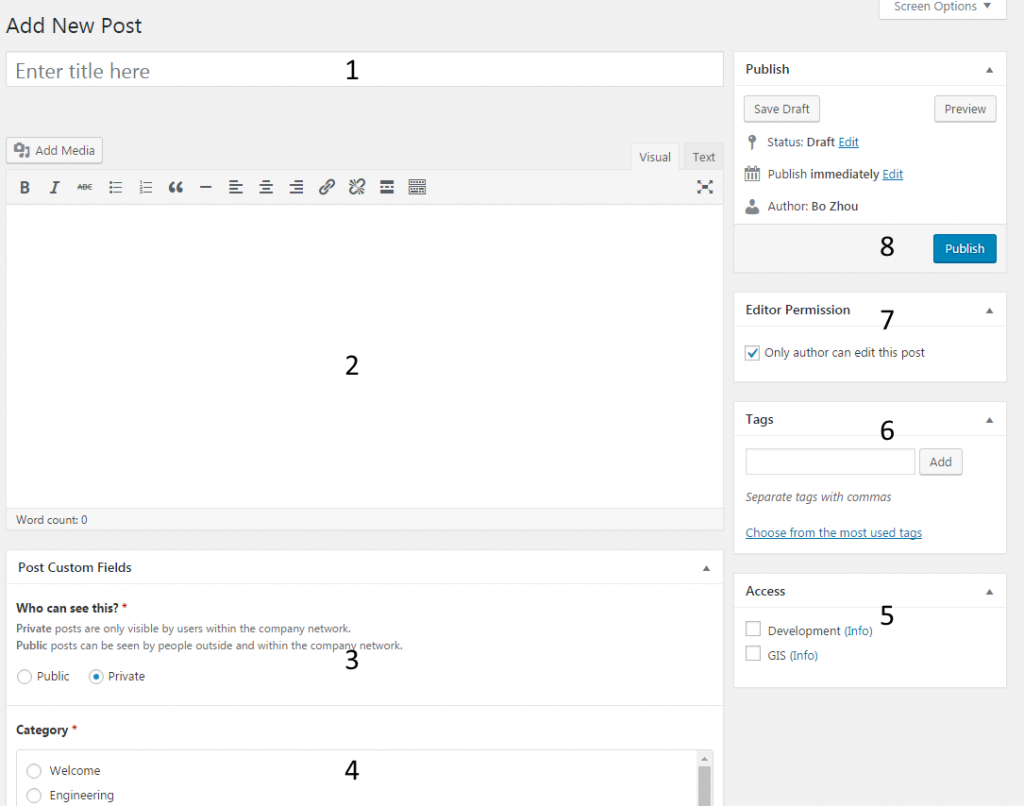
Notice: If you do not select any user groups in step 5, this post can be edited by any other editors, if you selected, only editors in the same groups can view and edit this post.